Business Tools
How to Review a Real Estate Agent: A Complete Guide
Learn how to review a real estate agent with our step-by-step guide. Discover key metrics, questions to ask, and how AI can streamline your evaluation process.
10 min read
ReadDiscover how to automate customer service with AI-powered tools to cut response times, reduce costs, and delight customers. Start improving today.
Automating customer service is all about using smart AI and other tools to take care of the routine, predictable stuff—like answering FAQs or checking an order's status—without a human having to lift a finger. Imagine a world where your support team isn't buried under a mountain of repetitive tickets. This simple shift frees up your team to tackle the tricky, high-value problems, all while giving your customers the instant, 24/7 support they've come to expect.
Picture your business running like a well-oiled machine, with a dedicated AI agent flawlessly handling the bulk of your customer questions, day or night. This isn't science fiction; it's exactly what platforms like Dooza AI make possible right now. By learning how to automate your customer service, you can move away from a reactive, manual support model and embrace a proactive system that works for you around the clock, even while you sleep.
Think about how much time your team burns on repetitive tasks. Password resets, "Where is my order?" questions, and answering the same basic questions over and over—it all adds up to a mountain of lost hours. Now, imagine reclaiming all that time. Imagine your best people, freed from the mundane, focusing on building real relationships, solving complex issues, and actually growing the business. This is the dream of automation.
This is a far bigger deal than just slapping a chatbot on your website. It's a fundamental redesign of your entire support operation. Instead of being a cost center drowning in manual work, your customer service can become a powerful, automated engine. This change delivers the consistent, instant help that modern customers don't just appreciate—they demand it.
For example, a growing e-commerce store can automate "Where is my order?" inquiries by connecting its AI to its shipping platform. The AI doesn't just spit out a canned response; it pulls real-time tracking information instantly. The customer is happy, and you just saved an agent five minutes. Multiply that by thousands of tickets, and the time saved is staggering—hours and hours of creative, strategic work reclaimed.
Imagine slashing your customer service costs by a whopping 30% while keeping your customers happier than ever—that's the power of AI automation in action.
Before we dive deeper, let’s quickly break down the core differences between the old way and the new way.
This table really highlights the shift in efficiency, cost, and overall customer experience when moving from a traditional support model to an AI-powered one.
| Metric | Manual Customer Service | Automated Customer Service (with AI) |
|---|---|---|
| Availability | Limited to business hours (e.g., 9-to-5) | Always on, 24/7/365 |
| Response Time | Minutes to hours, depending on queue | Instant, typically under 2 seconds |
| Cost Per Interaction | High (agent salaries, benefits) | Very low, fractions of a cent |
| Consistency | Varies by agent and mood | 100% consistent, follows defined rules |
| Scalability | Difficult and expensive to scale | Scales instantly to handle any volume |
| Agent Focus | Repetitive, low-value tasks | Complex, high-value, and strategic issues |
As you can see, the advantages of automation are clear and significant, impacting both your bottom line and your customer satisfaction scores.
The numbers don't lie. AI-powered tools can seriously cut operational costs by fielding routine inquiries, which often account for 65-70% of all support volume.
Fintech giant Klarna, for example, projected a massive $40 million profit boost in its first year using an AI assistant. How? By handling two-thirds of all customer chats—a workload equivalent to 700 full-time agents. Imagine what your team could achieve with the equivalent of 700 extra sets of hands. It's no surprise that by 2025, an estimated 80% of customer service organizations will be using generative AI in some form. You can dig into more compelling customer service statistics to see just how big this trend is.
Ultimately, this guide is here to walk you through transforming your support from a manual burden into a strategic asset. If you're weighing your options, our comparison of leading support tools can help clarify the landscape. The goal is simple: build a system that not only saves money but also creates a better experience for everyone.
Before you even think about building your first AI agent, you need a solid plan. Just jumping into automation without a clear strategy is a recipe for frustration. You'll spend a lot of time and resources only to end up with a clunky system that annoys customers and your team. This blueprint is your map to getting it right from the start.
Think about your team's day-to-day grind. How many hours are burned answering the same handful of questions over and over? That’s your starting point—your golden opportunity for automation. Imagine that time back in their day. The goal isn't just to cut down on manual work; it's to build a system that frees your best people to focus on what really matters.
This shift from manual effort to automated efficiency is what lets your business scale without constantly hiring more support staff. Your human team can then focus on complex problems, customer retention, and growth.
First things first: what are you actually trying to accomplish? Your answer here will steer every decision that follows. "Improving customer service" is too fuzzy. You need a concrete target you can hang on the wall and measure against.
Here are a few common, high-impact goals I've seen clients succeed with:
My advice? Pick just one of these to start. Nail it. A quick, decisive win builds the confidence and momentum you'll need for bigger automation projects down the road.
With your goal in mind, it's time to hunt for the low-hanging fruit. I'm talking about the simple, high-volume questions that eat up your team's day but don't require a human touch. These are the tasks a machine was born to do, freeing up human creativity.
For an e-commerce brand, this is almost always:
And for a SaaS company, the usual suspects are:
Pull up your support ticket data. The top 3-5 most frequent questions are your prime candidates. Automating just these will free up a surprising amount of your team’s time, almost overnight. You’ll see the ticket queue shrink and your team’s stress levels drop.
Now, think bigger than just your help widget. Look at the entire customer journey and pinpoint all the moments where an AI could step in and make a difference.
Could an AI agent on your pricing page answer a last-minute question and prevent someone from abandoning their cart? What about using AI to instantly reply to product questions in your Instagram DMs? Imagine a customer messaging your Facebook page about a new product and getting an immediate, helpful response with a direct link to buy. That’s how you turn a simple query into a sale, completely on autopilot. By looking at the whole picture, you can learn how to use AI for various business forms and interactions, not just support tickets.
This might be the most important piece of the puzzle. You need to design a completely seamless handoff from your AI to a human agent. The goal is a dream team, not a frustrating digital dead-end. A well-trained AI knows its limits and escalates complex or emotional issues right away.
A perfect handoff means the customer never has to repeat themselves.
When the AI flags a conversation for a human—for instance, when a customer says "I'm really upset about my delivery"—the entire chat history and any known customer details should land in your agent's lap instantly. Your team member can then jump in with full context, saying "I see your package was delayed, I'm so sorry. Let me fix this for you," making the customer feel heard and taken care of, not passed around.
Alright, this is where the fun begins. We’re moving from planning on paper to building a real, working AI agent that can start helping your customers. If you're picturing lines of code and a team of developers, think again. With modern platforms, this is less about engineering and more like onboarding a new team member—one who learns incredibly fast and is ready to work 24/7.
The first step is simply feeding your AI the right information. Think of it like handing a new hire your company's training manuals and letting them shadow your best support reps. You’ll give it access to your knowledge base, product documentation, and even the logs of past support tickets. The AI will absorb it all, getting up to speed on your products, policies, and the most common customer pain points in minutes.
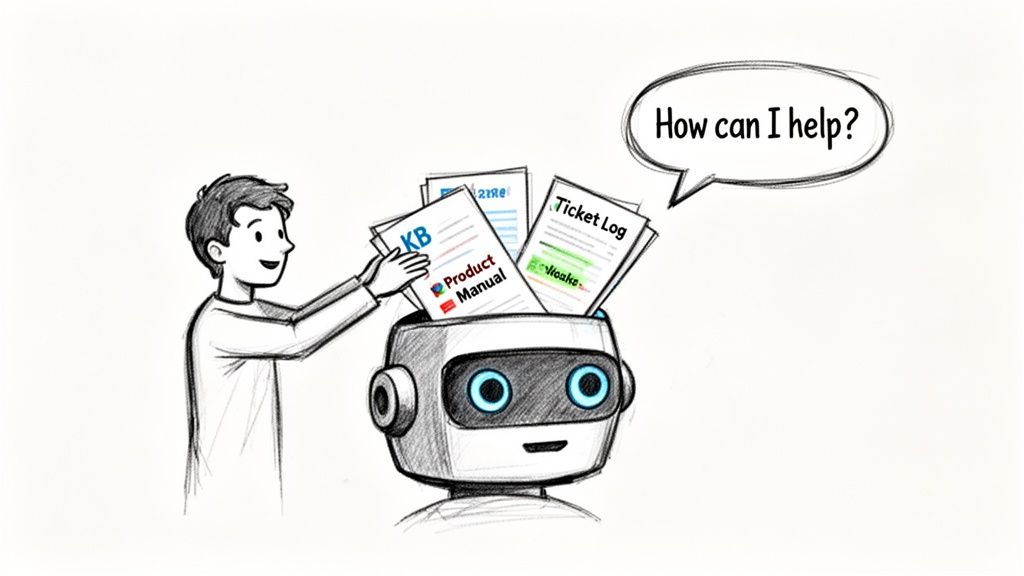
This initial data dump lays the groundwork. From there, we’ll start refining its knowledge, turning that raw information into smart, helpful conversations that sound just like your brand.
One of the biggest hang-ups I see from business owners is the fear that automation will make their brand feel cold and robotic. Honestly, it's a valid concern, but it doesn't have to be that way. The key is to deliberately give your AI a personality that reflects your brand's unique voice.
Are you helpful and professional? Quirky and fun? You get to decide. By feeding it examples of your best customer interactions or even your marketing copy, you teach the AI how to talk, not just what to say. This is how you make sure every automated response feels authentic.
This step is what elevates a generic chatbot into a true AI team member—one that represents your brand flawlessly.
Let's ground this in reality. Imagine you run an online store selling sustainable home goods. Your team is swamped with the same repetitive questions about returns, shipping, and product materials.
Using a platform like Dooza, you’d start by uploading your core business documents. It’s a simple drag-and-drop process.
The AI instantly processes all this. Now, when a customer asks, "Is your bedding made from organic cotton?" it doesn't just give a flat "yes." It can pull from all its sources to explain the GOTS certification, mention the benefits of the fabric, and even suggest matching pillowcases.
The real goal isn't just to answer questions faster. It’s about turning a routine query into a fantastic self-serve experience that builds trust and drives sales, all without needing a human to step in.
From there, you teach it specific actions. For a "where is my order?" request, you'll show it how to look up order data (once you connect your tools). For a return request, you'll map out the exact steps it needs to take to get the process started for the customer.
You could even train it to be an expert at upselling. If a customer asks about the warranty on a coffee maker, the AI can answer the question and then follow up with, "Great choice. Many customers who bought that coffee maker also love our fair-trade espresso beans. Would you like to see them?"
By training your AI on real situations, you're not just deflecting tickets; you're building an automated system that actually improves the customer journey. This is how you win back your day and let technology handle the grunt work. If you're curious about the best ways to organize your data for an AI, our guide on using AI-powered tables has some great tips.
An AI that operates in a vacuum is just a fancy FAQ page. The real power—the kind that actually frees up your team and makes customers happy—comes from deep integration. This is where you plug your new AI agent directly into the operational heartbeat of your company.
Think of it less like installing a new piece of software and more like giving your AI a keycard to every important system you use daily: your CRM, e-commerce platform, helpdesk, and more. This step transforms your bot from a simple Q&A machine into an active, problem-solving member of the team.
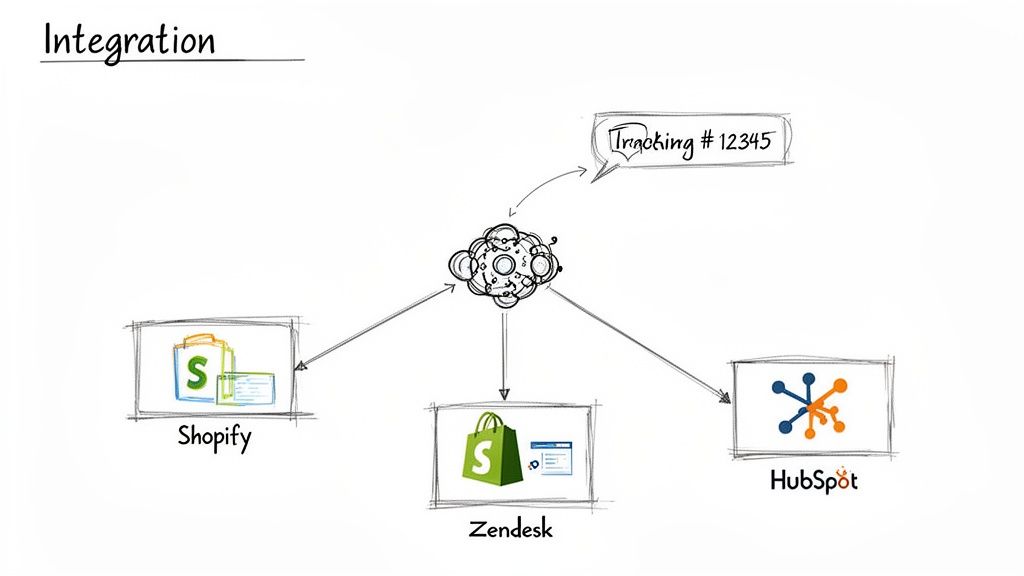
Without these connections, your AI is stuck giving canned responses. With them, it can pull real-time data and take action, delivering the kind of personalized, instant resolutions that truly free up your people.
Let's walk through a classic e-commerce example. A customer messages, "Where's my package?"
An un-integrated AI might just send a link to your general tracking page, leaving the customer to hunt for their order number and figure it out themselves. This isn't helpful, and it almost always results in a human agent having to step in anyway, which defeats the whole point.
Now, picture an AI that’s connected to your Shopify store. When that same question comes in, the AI securely identifies the customer, finds their latest order, and pulls the exact, real-time shipping status straight from the source. That’s a solved ticket, a satisfied customer, and zero time spent by your team.
This same logic applies across your entire tech stack:
The whole idea is to create a seamless two-way street for data. When your AI has the right access, it stops being a conversational gatekeeper and becomes a genuine doer in your business.
The real game-changer is when you can get different, specialized AIs to work together. Platforms like Dooza make this possible. It's like having your support expert tap the marketing expert on the shoulder to ask for info. This unified approach crushes the disjointed experience that siloed tools create.
For instance, a customer slides into your Instagram DMs asking why a promo code from a recent post isn't working. A standard support AI, with no access to social media activity, would be completely lost.
But with a collaborative setup, the support agent can query the social media agent. In seconds, it gets the context it needs: "Ah, the social media team's post mentioned 'SAVE20,' which expired last night. Here's a new code you can use instead." We actually cover this exact scenario in our guide on automating your Instagram Direct messages.
This kind of inter-AI teamwork is how you move from basic automation to a truly intelligent system. Your support AI knows what marketing is doing, your sales AI has context from recent support tickets, and they all share information. The result is a smarter, faster, and far more helpful experience that not only solves problems but also builds loyalty.
Your AI agent is trained, all the tools are connected, and it's showtime. This is the moment your hard work starts paying off, giving customers instant answers and freeing up your team from repetitive questions. But going live isn't like flipping a switch and walking away. A smart launch is a careful, strategic rollout designed to build momentum and create an engine that actually learns on the job.
Forget the "big bang" launch. You wouldn't send a new hire to handle every single customer on their first day, and the same principle applies here. The best approach is to start small and controlled. The real goal isn’t just deflecting a few tickets; it’s building a reliable system that can handle unlimited customer conversations without you needing to hire an army of support agents.
Rolling out your AI in stages is the single best way to reduce risk. It lets you spot any weird quirks or performance issues without throwing your entire customer experience into chaos. Think of it like a soft opening for a restaurant—you invite a few guests first to work out the kinks before the grand opening.
Here are a few practical ways I’ve seen this work beautifully:
This approach gives you a safe sandbox. You can watch key metrics like first-contact resolution and CSAT scores in a low-stakes environment. If something goes sideways, only a small slice of your audience is affected, and you can jump in to fix it fast.
Once your AI is live, your role shifts from builder to detective. You need to get obsessed with the data, especially the raw conversation logs. These transcripts are an absolute goldmine. They show you exactly where the AI is shining and, more importantly, where it’s stumbling.
Don't just give them a quick scan. Dig in and look for patterns.
Think of this as reviewing game film with a star player. Each conversation log is a chance to spot a weakness, run a new drill (like updating its knowledge), and make your AI even better for the next customer.
This constant review process is what separates a clunky, frustrating chatbot from a truly helpful AI assistant that people actually like using.
Ultimately, you want to create a living system. Your automation shouldn't just be a tool your team uses; it should be a partner they actively coach and improve. This is where your human experts become invaluable.
Set up a super simple way for your support team to flag problematic AI conversations—a dedicated Slack channel or a shared doc works perfectly. This creates a powerful, real-time feedback loop. Your team on the front lines sees what’s really happening and can feed that intelligence right back into the system.
For instance, an agent might notice the AI is giving a technically correct but incomplete answer about a new feature. They flag it, and you can instantly add the missing details to the AI's knowledge. The very next customer who asks gets the perfect response. This is how you learn how to automate customer service in a way that truly scales. As you think about the costs of growing this system, looking into transparent AI platform pricing models can help you budget for what’s ahead.
This cycle—deploy, monitor, refine—is what gives you the confidence to scale. You can slowly increase the percentage of traffic the AI handles, roll it out to new channels, and teach it to take on more complex problems. Soon enough, you'll have an automation engine that doesn't just deflect tickets but actually gets smarter every single day.
Jumping into automation brings up a lot of questions. That’s a good thing. It means you’re not just chasing a new trend; you’re thinking critically about how to reshape your customer interactions for the better. We hear the same concerns from smart teams all the time—they’re excited about the possibilities but want to make sure they get it right.
The goal is pretty straightforward: free up your team, give customers the instant answers they want, and build a support system that actually scales. Let's tackle the big questions that might be holding you back.
This is the big one, isn't it? No one wants their company to be known for a frustrating, tone-deaf chatbot. But here’s what’s changed: modern AI doesn't have to feel robotic in the slightest.
With a platform like Dooza, you aren't just flipping a switch on a generic bot. You're training an AI employee on your brand's unique voice and personality. You teach it how to be helpful, casual, formal, or even a little bit quirky—whatever makes your brand your brand.
The point isn't to fool customers into thinking they're talking to a person. It’s about delivering immediate, accurate help for the straightforward stuff, then seamlessly handing off the complex or emotional conversations to your human experts.
This actually makes your support more personal, not less. It saves your human team from the soul-crushing task of answering "Where's my order?" 100 times a day, freeing them up to provide thoughtful, high-impact help where it really counts.
Honestly, you need way less technical skill than you probably think. The days of needing a developer to build a basic bot are long over. The best AI platforms today are built to be no-code or low-code.
If you can write an FAQ page, draft a training guide for a new hire, or organize files in a folder, you’ve got the skills you need. Think of it more like onboarding a new employee than programming a piece of software.
You'll be spending your time on things like:
It’s all about teaching, not coding.
The most common trap we see is trying to automate 100% of interactions from day one. This "all-or-nothing" mindset is a recipe for a clunky, frustrating customer experience.
Start small. Be strategic. Pinpoint the top 3-5 most frequent, simple, and repetitive questions your team gets bogged down with. Automate those first. For example, just handling order tracking and password resets can clear up 30% of your ticket volume overnight. This scores you a quick, tangible win and lets you learn how everything works in a low-risk way.
Another huge mistake is creating the dreaded "automation loop"—that digital dead-end where a customer is stuck with a bot that can't help and offers no escape. You absolutely must provide a clear, easy, and immediate way for a customer to reach a human if the AI can't solve their problem.
You have to be able to measure the return, and it’s a mix of hard numbers and softer, but equally important, feedback. Any solid AI platform should give you a dashboard that makes tracking these KPIs easy.
For the hard numbers, keep an eye on:
Then, for the qualitative wins, look at:
When you see your ticket volume drop while your CSAT scores hold steady or even climb, you know you’ve hit the sweet spot. You aren't just cutting costs; you're building a better experience for everyone.
Ready to stop drowning in support tickets and start building a smarter business? With Dooza, you can hire specialized AI employees to automate everything from customer service and SEO to social media management. Imagine your team, both human and AI, working together seamlessly with shared context. Discover how Dooza can transform your workflow today.
Automate your business with AI employees that work 24/7.
Learn how to review a real estate agent with our step-by-step guide. Discover key metrics, questions to ask, and how AI can streamline your evaluation process.
In a viral video, Amanda from Swell Entertainment calls out AI customer service bots for being frustrating and useless. But the problem isn't AI—it's bad AI. Discover how Dooza's AI employees (Maily, Somi, Ranky, Stan) deliver human-like, 24/7 support without the headache.
Join thousands of companies using Workforce to automate their work. Get started for free today.
No credit card required · 7-day money-back guarantee · Cancel anytime