How to Automate Prospecting: The End-to-End Guide for 2026
Automate your entire prospecting workflow — from ICP definition to booked meetings. Step-by-step system with tools, templates, and metrics.
14 min read
July 7, 2026
Why Manual Prospecting Is Killing Your Growth
Here is what manual prospecting looks like in practice. You spend Monday morning on LinkedIn, searching for people who might be a fit. You find 15 profiles that look promising. You open each one, check their company, see if they might need what you sell, find their email (or guess it), and add them to a spreadsheet. That takes 2 hours.
Tuesday, you write emails to those 15 people. You try to personalize each one, referencing something from their profile or company. That takes another 2 hours. By Wednesday, you have sent 15 emails. You get one reply — "not interested." Thursday, you do it again. By Friday, you realize you forgot to follow up on last week's batch.
This is the reality for millions of sales professionals and business owners. And it is why learning how to automate prospecting is not a nice-to-have — it is the difference between a business that grows predictably and one that is always scrambling for the next deal.
The numbers make the case clearly:
A salesperson doing manual prospecting contacts 50-80 prospects per week
An automated system contacts 200-500 prospects per week with better personalization
Manual follow-up happens on 20% of leads (the rest are forgotten)
Automated follow-up happens on 100% of leads, exactly on schedule
Manual prospecting costs 15-20 hours per week of human time
Automated prospecting costs 1-2 hours per week of oversight
The gap is not marginal. Automation delivers 4-10x more volume with better consistency and lower cost. And with AI-powered personalization, the quality of automated outreach now matches or exceeds what most humans produce manually.
Step 1: Build Your ICP — The Foundation Everything Depends On
Every prospecting failure traces back to a fuzzy ICP. "We sell to businesses" is not an ICP. "We sell to e-commerce brands doing $2M-$15M revenue, based in the US, using Shopify, with 10-50 employees, who are currently hiring for marketing roles" is an ICP.
The sharper your ICP, the better every downstream step performs. A tight ICP means higher email open rates (because the subject line resonates), higher reply rates (because the message addresses real pain), and higher meeting-to-deal conversion (because the prospects genuinely need what you sell).
The ICP Document Template
Write this down and share it with anyone involved in your sales process:
Industry: Be specific. Not "technology" — "B2B SaaS in HR tech and recruiting."
Company size: Employee count range and revenue range if possible. "20-200 employees, $2M-$20M ARR."
Geography: Where are your best customers? Start there. "US and UK, English-speaking markets."
Decision maker: Title and seniority level. "VP of Sales, Head of Growth, or CEO at companies under 50 employees."
Pain point: The specific problem you solve, in their words. "Spending $8K+/month on SDRs but not hitting pipeline targets."
Trigger events: What happens right before someone needs your solution? "Just posted an SDR job listing. Had a leadership change in sales. Raised a funding round."
Disqualifiers: Who should you NOT contact? "Companies already using a direct competitor. Companies with fewer than $1M in revenue. Businesses in industries we do not serve."
Mining Your Existing Customer Base
The best ICP data comes from your own customers. Look at your 10 best clients and answer:
What industry are they in?
How big are they?
What was happening in their business when they bought from you?
Who signed the contract — what was their title?
What problem were they trying to solve?
How long was the sales cycle?
How did they find you?
The patterns in these answers define your ICP better than any market research report. If 7 out of 10 best clients are e-commerce brands with 20-50 employees who found you through cold outreach, that is your ICP — regardless of what your marketing website says about serving "businesses of all sizes."
Step 2: Automated Lead Sourcing — Finding Prospects While You Sleep
Once your ICP is locked, the next step is building a system that finds matching prospects continuously. Manual searching on LinkedIn is not scalable. You need automated lead sourcing.
Database-Driven Sourcing
B2B data platforms like Apollo.io, ZoomInfo, and Cognism maintain databases of companies and contacts. You set filters matching your ICP — industry, size, location, title — and the database returns matching contacts with email addresses and phone numbers.
The key metric: email accuracy. A 90% accuracy rate means 10% of your emails bounce. At scale (500+ emails per week), a 10% bounce rate will damage your sender reputation within weeks. Always verify emails through a secondary verification service before sending.
Intent-Based Sourcing
Intent data identifies companies that are actively researching solutions like yours. They might be visiting competitor websites, searching for relevant keywords, or engaging with content in your category. Tools like Bombora, G2, and 6sense provide intent signals.
Intent-based prospecting typically generates 2-3x higher reply rates than cold outreach to non-intent contacts, because you are reaching people who already have the problem top of mind.
Trigger-Based Sourcing
This is the most underutilized approach and often the most effective. Instead of searching databases, you monitor for events that indicate a company needs your solution:
Job postings: A company hiring an SDR probably needs help with sales pipeline. A company hiring a content marketer probably needs content services.
Funding announcements: Companies that just raised a round have budget and growth pressure.
Technology changes: A company that just adopted Salesforce probably needs help configuring it.
Leadership changes: New VPs of Sales or Marketing often bring new vendors and strategies.
Company news: Acquisitions, product launches, expansions — all create new needs.
Tools like Clay, Trigify, and LinkedIn Sales Navigator allow you to set up trigger-based alerts that automatically source prospects when relevant events occur.
Step 3: Enrichment and Research — What Transforms Cold Email into Warm Outreach
You have a list of 500 prospects matching your ICP. Now what? If you blast them all with the same template, you will get a 1-2% reply rate. If you research each one and write genuinely personalized outreach, you will get 5-12%. The difference is enrichment.
Enrichment adds context to your prospect data — information that makes your outreach relevant and specific. Here is what good enrichment looks like:
Company-Level Enrichment
Recent company news and press mentions
Technology stack (what tools do they use?)
Current job openings (what are they investing in?)
Social media activity (what are they talking about?)
Website traffic trends (are they growing or declining?)
Competitive landscape (who do they compete with?)
Person-Level Enrichment
Recent LinkedIn posts and activity
Career history and time in current role
Shared connections or mutual interests
Published content, podcast appearances, or conference talks
Professional interests and expertise areas
Automating Enrichment
Clay is the leading enrichment platform for automated prospecting. It connects to 75+ data providers and allows you to build "waterfall" enrichment flows — if data source A does not have the information, it automatically tries source B, then C. This ensures maximum coverage while minimizing credit usage.
For simpler setups, Apollo.io provides basic enrichment included with their prospecting plans. It covers company info, contact details, and some technology data. Not as deep as Clay, but sufficient for many use cases and significantly simpler to use.
Step 4: Outreach Automation — Sending the Right Message at the Right Time
With enriched prospect data in hand, the next step in learning how to automate prospecting is setting up your outreach engine. This is where AI has made the biggest leap — from template-based mail merge to genuinely personalized, individually researched outreach at scale.
Email Infrastructure (Non-Negotiable)
Before sending a single cold email, your infrastructure must be right. This is not optional — skip it, and your emails go to spam:
Secondary domains: Never send cold email from your primary business domain. Buy 2-3 similar domains (e.g., getacme.com, acme-team.com). Cost: $10-$15/year each.
Email accounts: Set up Google Workspace on each domain. Create 2-3 accounts per domain. Cost: $6/user/month.
Authentication: Configure SPF, DKIM, and DMARC for every domain. This is what tells receiving mail servers that your emails are legitimate.
Warm-up: Run email warm-up for 14-21 days before sending any cold emails. This builds sender reputation by exchanging real emails with real inboxes.
AI-Powered Email Writing
The best automated prospecting systems use AI to write individually crafted emails for each prospect. Not mail merge with {first_name} and {company} swapped in — genuinely different emails based on what the AI learned during enrichment.
A good AI-written email reads like this:
"Hi Sarah — noticed Acme just posted a role for a second SDR. When companies are scaling outbound at your stage, the bottleneck usually is not headcount, it is the research and personalization that makes cold email actually work. We help companies like [similar company] automate that research layer so each SDR produces 3x more qualified meetings. Worth a 15-minute look?"
Compare that to a template:
"Hi {first_name}, I help companies like {company} improve their sales outreach. Would you be open to a quick call?"
The first email gets 8-12% reply rates. The second gets 1-2%. AI makes the first version possible at scale — 200-500 individually crafted emails per day.
Sequence Design
A single email is not a prospecting system. You need a sequence — a planned series of touches over time. Here is a proven 4-email framework:
Email 1 (Day 1): Personalized observation + value prop + soft CTA. Reference something specific about their business.
Email 2 (Day 3): Social proof angle. Share a relevant case study or metric from a similar company.
Email 3 (Day 7): Different approach. Come at the problem from a new angle — maybe a question, a stat, or a contrarian take.
Email 4 (Day 12): Breakup email. Acknowledge the timing might be off. Leave the door open without being pushy.
Most meetings come from emails 2-4, not email 1. The follow-up sequence is where the real value of automation shines — because humans forget follow-ups, but automation never does.
Step 5: From Reply to Meeting — Closing the Loop
Automated prospecting generates replies. But replies are not revenue — meetings are. The gap between "reply received" and "meeting booked" is where many automated systems fail.
Reply Classification
Not all replies are equal. An effective system automatically classifies replies into categories:
Curious but not committed: "Send me more information." — Send a case study or one-pager, then follow up in 3 days.
Not now, maybe later: "We're focused on other priorities this quarter." — Add to nurture sequence, check back in 60-90 days.
Wrong person: "You should talk to our VP of Sales." — Thank them, find the VP's contact, start a new sequence.
Not interested: "Not relevant for us." — Respect the decision, remove from sequence, add to exclusion list.
Out of office: — Pause the sequence, resume when they return.
AI handles this classification automatically. When someone expresses interest, the system immediately triggers the booking flow.
Speed to Response
When a prospect replies to your cold email expressing interest, you have a narrow window. Data shows:
Response within 5 minutes: 21% conversion to meeting
Response within 30 minutes: 15% conversion
Response within 1 hour: 10% conversion
Response after 24 hours: 4% conversion
Automated reply handling eliminates the response delay entirely. When a positive reply comes in, the system immediately sends a booking link or suggests available times — no waiting for a human to notice the email.
Meeting Booking Automation
The final step: making it effortless for interested prospects to schedule a meeting. Use a booking tool (Calendly, Cal.com, or SavvyCal) integrated with your outreach system. When AI detects a positive reply, it sends available times or a direct booking link within minutes.
Pro tip: include 2-3 qualifying questions on your booking page. This filters out time-wasters and gives you context before the call. Keep questions simple: "What is your biggest challenge with [your problem area]?" and "How many [relevant metric] do you currently have?"
How Dooza Automates Prospecting End-to-End
If you have read this far, you might be thinking: "This is a lot of steps, a lot of tools, and a lot of things that can go wrong." You are right. Building a DIY automated prospecting system works, but it requires 10-15 hours per week of management and expertise across 4-5 different tools.
Dooza Agents collapses the entire prospecting automation workflow into a single platform, starting with a refundable pilot (100% refund within 14 days). Here is how it maps to the steps we just covered:
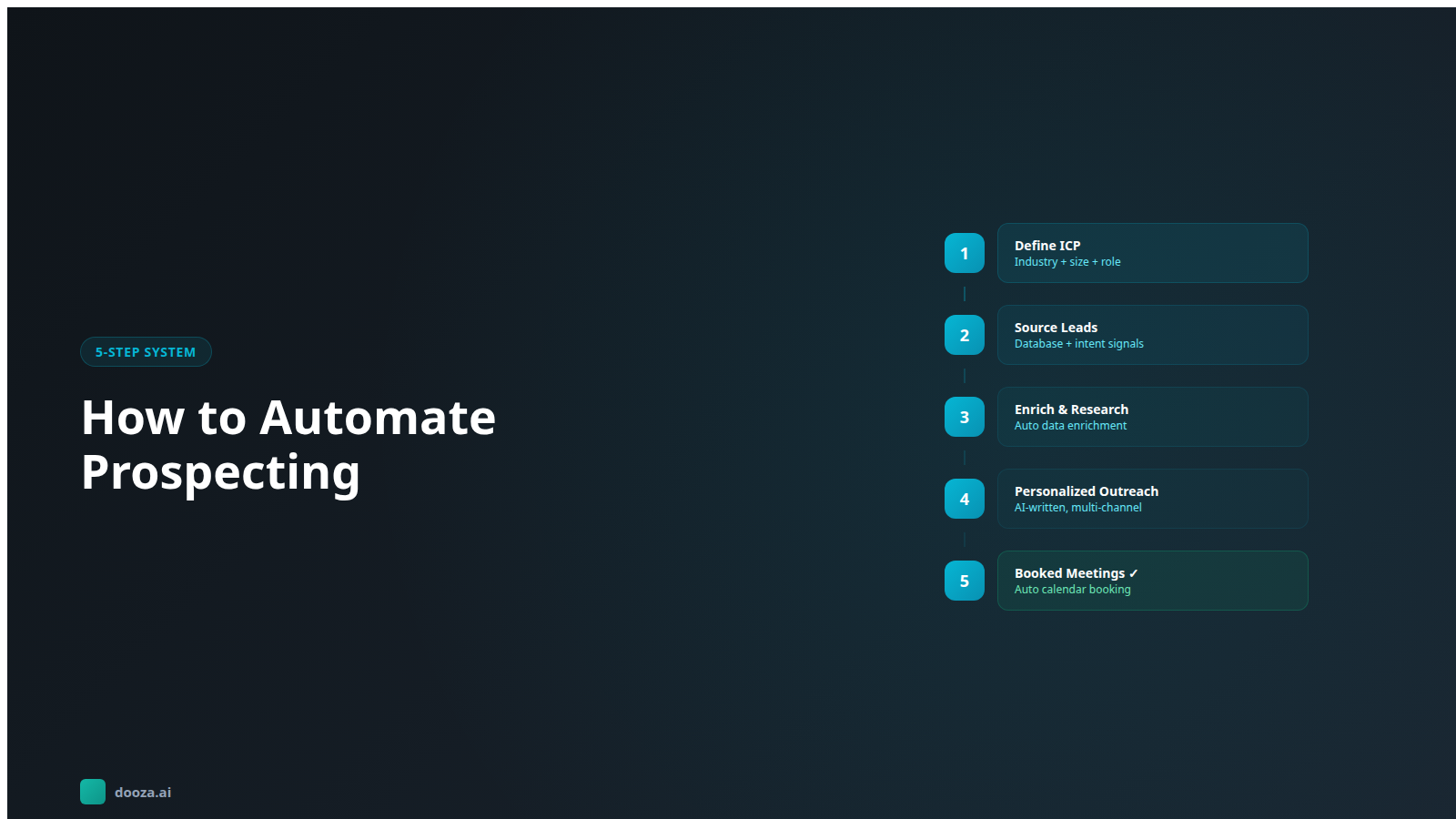
ICP Definition: Describe your ideal customer in plain language. No complex filter setups — just tell Dooza who you are looking for, the way you would describe it to a colleague.
Lead Sourcing: AI continuously finds companies and contacts matching your ICP. Fresh prospects are sourced daily from web data, job boards, and intent signals — no separate data subscriptions needed.
Enrichment: Each prospect is individually researched before any outreach. Company website, recent news, LinkedIn activity, technology stack, job postings — the AI builds a complete picture before writing a single word.
Personalized Outreach: Genuinely unique emails for every prospect, based on their specific situation. Not template variables — real, researched personalization that references what the AI learned about them.
Automated Follow-Up: Multi-step sequences run on schedule. Every prospect gets followed up. No leads lost because you got busy with other work.
Reply Management: AI reads, classifies, and responds to every reply. Interested leads get meeting booking links. Objections get addressed. Not-now leads get added to nurture. Opt-outs are honored immediately.
Meeting Booking: Qualified prospects are booked directly onto your calendar. You open your calendar to find meetings with warm, researched leads — no manual scheduling required.
One platform. One subscription. Zero tool-stack management. The entire prospecting workflow — from ICP to booked meeting — runs automatically while you focus on closing deals.
See Dooza pricing and compare it to the cost of building and managing a DIY prospecting stack.
Watch: AI Sales Prospecting Complete Guide
This comprehensive video walks through every step of AI-powered sales prospecting — from ICP definition through tool selection, campaign setup, and optimization. Essential viewing for anyone serious about automating their prospecting workflow.
Bottom Line
Learning how to automate prospecting is not about buying a single tool — it is about building a system where each step feeds the next. ICP definition drives lead sourcing. Enrichment drives personalization. Personalization drives reply rates. Reply management drives meeting booking. When every step is automated and connected, you get a prospecting engine that runs 24/7 and delivers qualified meetings to your calendar with minimal oversight. You can build this system from individual tools at $250-$400/month (plus 10-15 hours/week of management), or use Dooza Agents, starting with a refundable pilot, and skip the assembly entirely. Either way, the days of spending 15-20 hours per week manually searching LinkedIn and writing one-off emails are over. Automate the grind. Focus on the conversations that close deals.
Frequently Asked Questions
What does it mean to automate prospecting?
Automating prospecting means using AI and software tools to handle the repetitive steps of finding and reaching potential customers — identifying companies that match your ideal customer profile, finding decision-maker contact information, researching each prospect for personalization, sending outreach messages, following up on schedule, and booking meetings. Instead of a human spending 15-20 hours per week on these tasks, automated systems handle them continuously with minimal oversight.
How much prospecting can be automated?
Roughly 80-90% of the prospecting workflow can be automated in 2026. Lead sourcing, contact enrichment, email personalization, multi-step follow-up, and meeting scheduling are fully automatable. The remaining 10-20% that benefits from human involvement includes ICP refinement based on closed-deal patterns, handling complex reply scenarios, and the actual sales conversation once a meeting is booked. The goal is not 100% automation — it is automating the repetitive parts so humans focus on high-value conversations.
What tools do I need to automate prospecting?
A complete automated prospecting system requires tools for four functions: data (finding prospects), enrichment (researching them), outreach (contacting them), and booking (scheduling meetings). You can build this with individual tools — Apollo for data, Clay for enrichment, Instantly for outreach, Calendly for booking — each billed separately. Or you can use a platform like Dooza that handles all four functions, starting with a refundable pilot (100% refund within 14 days). The DIY approach gives more control; the platform approach saves 10+ hours per week in management time.
How many prospects should I contact per day?
Start with 30-50 new prospects per day across all email accounts. If you have 3 email accounts sending 15-20 emails each, that is 45-60 emails per day. After 30 days of stable deliverability (95%+ delivery rate, 40%+ open rate), you can scale to 40-50 per account. Never exceed 75 per account per day. The limiting factor is not sending capacity — it is list quality. Sending to 50 perfect-fit prospects beats sending to 200 vaguely relevant ones every time.
How do I know if my automated prospecting is working?
Track these metrics weekly: delivery rate (target: 95%+), open rate (target: 40%+), reply rate (target: 5-12%), positive reply rate (target: 2-5%), and meetings booked per 1,000 emails sent (target: 8-20). If your open rate is below 35%, you have a deliverability or subject line problem. If your reply rate is below 3%, your messaging or targeting needs work. If you get replies but not meetings, your call-to-action or booking process is the bottleneck. Diagnose and fix the weakest link first.
Ready to Start Your Pilot?
Automate your business with AI employees that work 24/7. Start with a refundable pilot: 100% refund within 14 days.
The Real Cost of Hiring an SDR in 2026: Salary, Tools, and Hidden Expenses
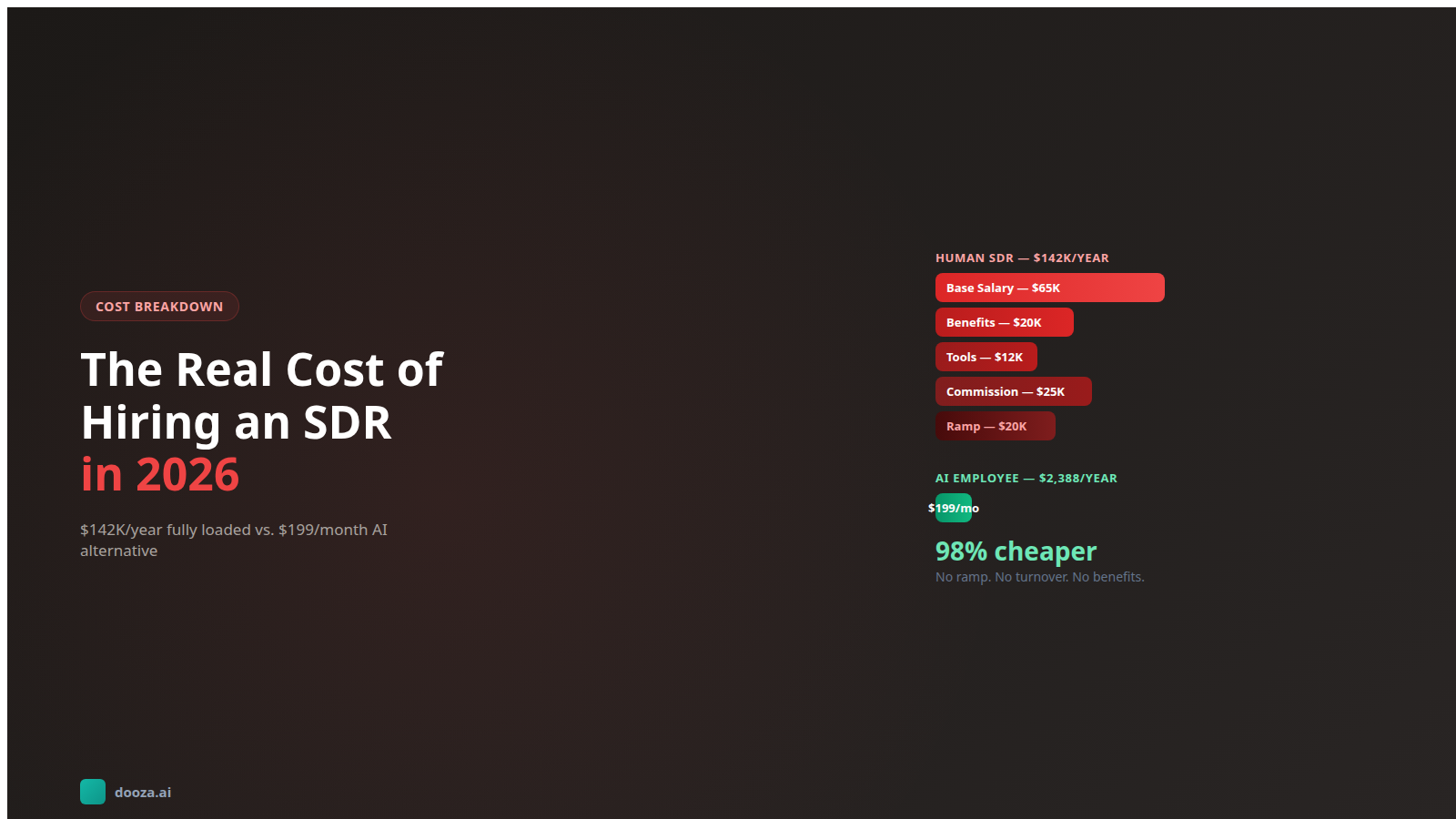
By our estimate, hiring an SDR costs roughly $100K-$110K in year one once you add variable pay, benefits, tools, and ramp time. Sourced breakdown and a smarter alternative.
Start with a refundable pilot — 100% refund within 14 days. A Dooza engineer scopes it with you on a free 30-minute call. Pricing depends on the product; see pricing.