Customer Service
Customer Service Outsourcing: Complete Guide for 2026
Complete guide to customer service outsourcing in 2026. Compare regional costs, evaluate pros and cons, and discover AI-powered alternatives.
12 min read
ReadHow to build an end-to-end AI workflow that handles customer support from intake to resolution. Pipeline architecture, automation steps, and deployment guide.
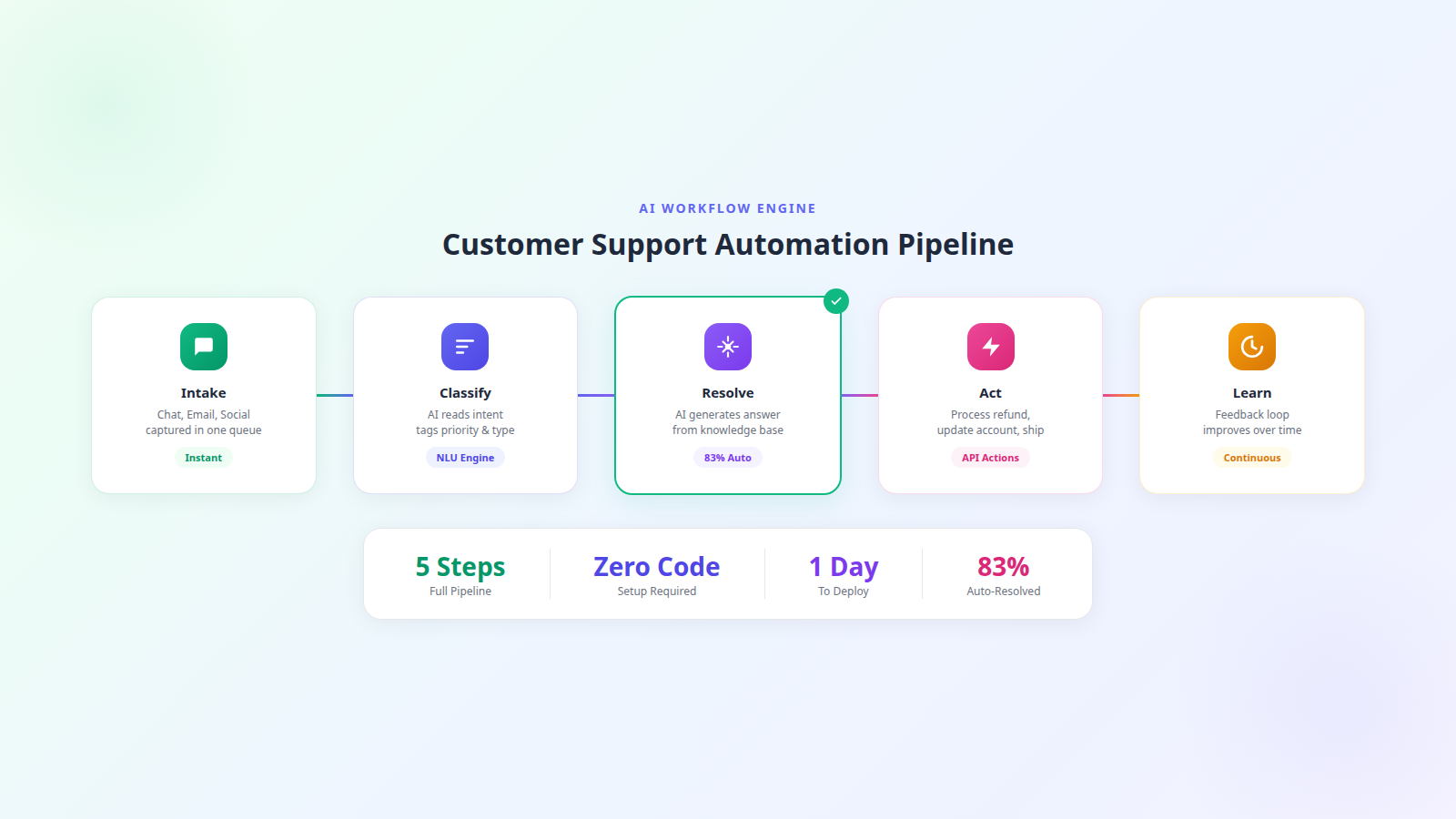
AI workflow automation for customer support is the practice of building an end-to-end pipeline where AI handles every step of a support interaction — from the moment a customer sends a message to the final resolution and follow-up. This goes far beyond chatbots. A chatbot answers scripted questions. A workflow automation system classifies tickets, retrieves knowledge, generates responses, executes actions, routes escalations, and improves itself over time.
McKinsey estimates that generative AI could lift customer care productivity by 30 to 45 percent of current operating costs. The key word is "workflow" — isolated AI tools help, but connected workflows transform your entire support operation.
Most businesses start with one AI tool — a chatbot on their website or an auto-responder on email. These help, but they create silos:
Workflow automation connects every stage. The result is a system that gets smarter, faster, and more cost-effective over time — not a collection of disconnected tools that each solve one-fifth of the problem.
For businesses already using customer service automation, the next step is connecting those tools into a coherent pipeline.
Here is the complete workflow architecture that replaces a traditional support team:
Customers reach out via chat, email, social media, SMS, and sometimes phone. Without automation, each channel is a separate inbox requiring separate monitoring. The intake stage captures all messages into a single unified queue regardless of source.
Processing time: under 1 second. No message is missed regardless of channel or time of day.
The natural language understanding engine reads the customer's message and determines:
Classification accuracy with modern LLMs exceeds 95 percent for well-defined categories. The AI tags the ticket and routes it to the appropriate resolution path in under 2 seconds.
This is where the AI does the heavy lifting. Based on the classified intent, it:
The resolution rate at this stage determines your automation ROI. Well-configured systems resolve 75 to 83 percent of tickets here without any human involvement. The remaining 17 to 25 percent move to escalation.
For tickets that require more than information — refund processing, subscription changes, password resets, return label generation — the AI connects to your backend systems via API and executes the action directly.
The AI always confirms with the customer before executing irreversible actions. "I will process a $34.99 refund to your Visa ending in 4821. Should I go ahead?" This builds trust while maintaining automation speed.
Every escalated ticket is training data. The learning stage captures:
Weekly, you review the top 5 escalation categories and add knowledge base content to cover them. This creates a flywheel: more resolutions lead to more training data which leads to even more resolutions. Most teams see their auto-resolution rate climb 3 to 5 percentage points per month for the first six months.
Building this 5-stage pipeline from scratch requires integrating multiple tools — a chat platform, an NLU engine, a knowledge base, API middleware, and analytics. Dooza packages the entire workflow into a single AI employee that you deploy in a day.
Every Dooza product starts with a refundable pilot — 100% refund within 14 days. You are not buying five tools and hoping they work together — you are deploying one integrated system that handles your entire support workflow without hiring.
Follow this plan to go from zero to full workflow automation:
Track these metrics at each pipeline stage:
See the complete 5-stage pipeline running on real customer conversations — from intake through resolution and learning.
Point solutions solve pieces of the support puzzle. Workflow automation solves the whole thing. A connected 5-stage pipeline — intake, classify, resolve, act, learn — delivers faster responses, lower costs, and continuously improving quality. Stop stitching together disconnected tools and deploy a complete AI workflow with Dooza's refundable pilot (100% refund within 14 days).
AI workflow automation for customer support is a system where AI handles the entire support pipeline from message intake to resolution without manual intervention. It includes automated ticket classification, knowledge base retrieval, response generation, action execution like refunds or account updates, and continuous learning from customer interactions. Unlike simple chatbots, workflow automation handles multi-step processes end-to-end.
A chatbot answers questions from a script. Workflow automation runs an entire support operation. It classifies tickets by intent, routes based on priority, pulls answers from multiple data sources, executes actions in your backend systems, escalates complex cases with context, and learns from every interaction. It is the difference between a FAQ page and a full support team.
The five stages are intake (capturing messages from all channels into one queue), classification (AI reads intent and assigns priority and category), resolution (generating answers from your knowledge base), action (executing tasks like refunds or account changes via API), and learning (using feedback and escalation data to continuously improve accuracy).
Yes. Modern AI workflow engines connect to your backend systems via API to execute transactional actions. This includes processing refunds, updating subscription plans, resetting passwords, generating return labels, and modifying account settings. The AI confirms the action with the customer before executing and provides confirmation afterward.
Basic workflow automation deploys in one to three days. You connect your knowledge base, set classification rules, configure escalation triggers, and optionally connect API actions. Dooza handles the pipeline architecture so you only need to provide your business content and preferences. No coding required for standard workflows.
Expect 50 to 60 percent auto-resolution in the first week, rising to 75 to 83 percent by month two as the AI learns from escalations and you fill knowledge gaps. Top-performing implementations reach 90 percent or higher for businesses with well-documented products and straightforward support processes.
Automate your business with AI employees that work 24/7. Start with a refundable pilot: 100% refund within 14 days.
Complete guide to customer service outsourcing in 2026. Compare regional costs, evaluate pros and cons, and discover AI-powered alternatives.
Weigh the real pros and cons of outsourcing customer service. Compare costs and tradeoffs, then discover how AI handles it at a fraction of the price.
Start with a refundable pilot — 100% refund within 14 days. A Dooza engineer scopes it with you on a free 30-minute call. Pricing depends on the product; see pricing.
Refundable pilot · 100% refund within 14 days · No contracts