AI Automation
Top AI Automation Companies to Watch in 2026
Discover the leading AI automation companies transforming business workflows in 2026. Learn how agentic AI and digital workers can boost your efficiency.
10 min read
ReadDiscover how project management automation can eliminate busywork and free your team to focus on what matters with AI-powered workflows.
Project management automation is your ticket to a world without busywork. It’s about using smart software and AI to take over the tedious, repetitive tasks that clog up your team's day, so you can finally focus on what matters. Imagine digital assistants that handle everything from assigning tasks to pinging stakeholders for updates, clearing the deck for innovation and growth. This isn't science fiction; it's the new reality of work, and it's here to free your team.
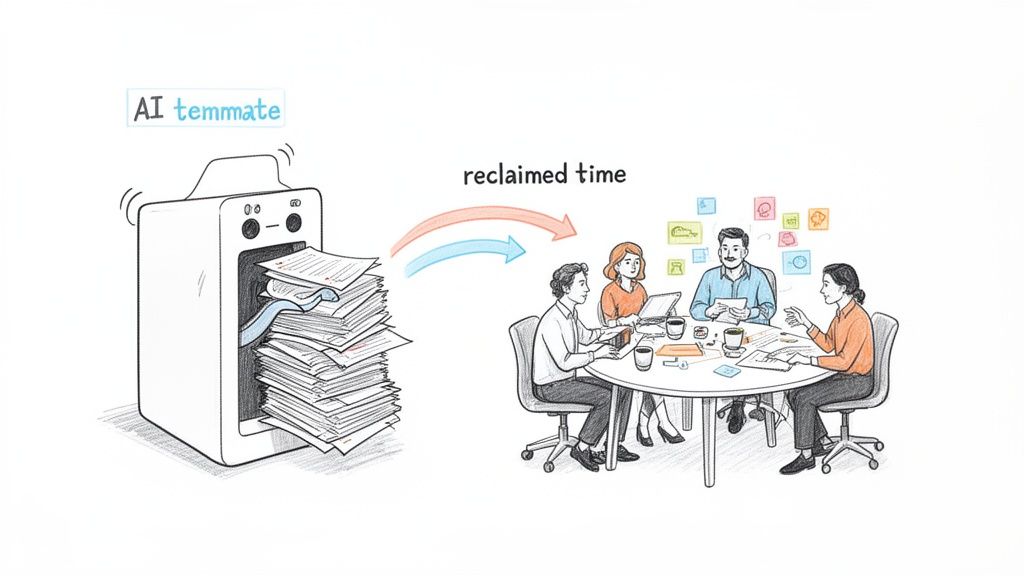
Picture this: it's Friday afternoon. Instead of frantically chasing down status updates or digging through chaotic email threads for a single deadline, your team is brainstorming your next big move. They’re energized, creative, and focused on the future. This isn't some far-off fantasy; it’s the dream that project management automation delivers right now by eliminating the administrative quicksand that drowns productivity.
This technology is making a huge impact by taking over the monotonous jobs that drain your team's time and energy. It's like hiring a new kind of employee—an AI teammate—that works 24/7, never makes a mistake, and is dedicated to crushing the repetitive work that slows everyone else down.
These aren't your basic, one-trick bots. Today's AI "employees" can manage complex, multi-step processes that are essential to your business but don't need a human's creative touch. This is your chance to give your team back their most valuable resource: time. Time to innovate, strategize, and solve the tough problems they were actually hired for.
Imagine what you could do if an AI stepped in to handle:
This is about more than just shaving a few minutes off a task. We're talking about reclaiming hundreds of hours every single month—time that can be put back into high-impact work that actually moves the needle for your business.
For startup founders and operations managers, this is the dream: a clear path to building a more efficient and innovative work environment. It's how you empower your team to finally concentrate on the ambitious goals that define your success, instead of getting bogged down in the process.
When you bring in project management automation, you're doing more than just making things run smoother. You're creating the workplace everyone wants: one where people are valued for their minds, not their ability to perform robotic tasks. Research shows that employees often spend a huge chunk of their week on tasks that could easily be automated, which is a fast track to burnout and disengagement.
By handing these tasks over to an AI, you give your team the space to do deep, meaningful work. Your marketing lead can brainstorm a killer campaign strategy instead of manually pulling analytics. Your operations manager can design better systems instead of just trying to keep the current ones from breaking. The dream is a team that leaves work every day feeling accomplished, not just busy.
This is the real promise of automation. It’s not about replacing people. It's about amplifying their skills and creating a powerful partnership where human talent and AI efficiency work side-by-side. The result? A faster, smarter, and more creative organization that’s ready to take on its biggest challenges.
Your journey into project management automation starts with a simple but powerful question: “What repetitive task, if it disappeared forever, would make my team cheer?”
Before you can build a slick, automated system, you have to play detective inside your own company. The goal is to hunt down the bottlenecks and busywork that are quietly draining your team’s focus and energy. This isn't about some massive, top-down overhaul. It's about finding the small, painful processes that, once automated, deliver an immediate and very noticeable impact.
Think about your operations team. Maybe for every new client, they manually create a project, copy and paste the same info, assign the same five starting tasks, and send out the same welcome email. This is a perfect candidate for automation—it's predictable, based on rules, and happens over and over. Every time someone does this by hand, it’s not just a time-sink; it’s a chance for a small typo or a missed step to snowball into bigger problems.
The best place to start is with tasks that are high in volume but low in complexity. These are your quick wins. They prove the value of automation right away and build the momentum you need for bigger, more ambitious projects. Don’t try to automate a multi-stage product launch on day one. Instead, focus on the daily or weekly grind.
Here are some examples of what this looks like for different teams:
The goal isn’t just about saving time. It's about building a system that is more reliable, consistent, and scalable than any manual process could ever be. You’re creating an operational backbone that works for you 24/7, even while you sleep. That’s the dream of a truly automated business.
To find the perfect first jobs for your AI employee, use this simple checklist. If a task ticks most of these boxes, it's a strong contender. Think of it as writing a job description for a robot—it has to be clear, structured, and repeatable.
Run your daily tasks through this filter:
By starting with a focused audit of your current processes, you’re not just randomly plugging in tools. You’re strategically designing an automated system that targets your biggest pain points first, guaranteeing you see real, measurable results right from the start.
Alright, you've identified the tedious, soul-crushing tasks that are prime for a takeover. Now for the fun part: designing the automated workflows that will completely reshape your team's day-to-day. This is where you graduate from planning to building, architecting a system where your team and their new AI teammates work in perfect harmony.
Imagine a marketing agency launching a new campaign. The old way was a frantic scramble of spreadsheets, endless email chains, and constant "just checking in" messages. The new way? A beautifully designed workflow where an AI "employee" handles all the grunt work, leaving your human team free to do what they do best—strategy and creative thinking. This is the dream of a friction-free workplace made real.
This isn't just about hooking up a few apps. It's about treating AI as a genuine member of your team with its own job to do.
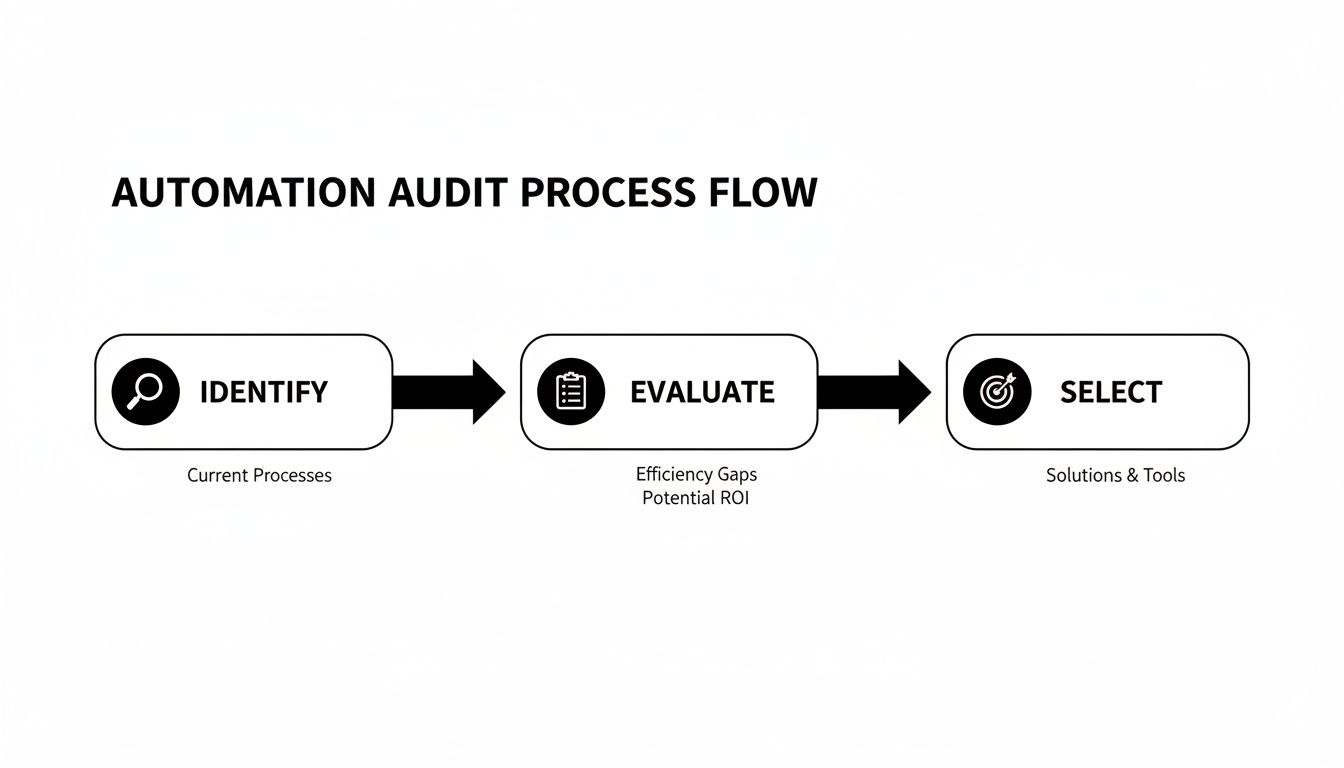
This simple flow—identify, evaluate, and select—is the foundation of any solid automation strategy. Kicking things off with a proper audit ensures you're solving your biggest headaches first.
At its heart, every automated workflow follows a simple sequence: Trigger → Action → Integration. Think of it like setting up digital dominoes. One event (the trigger) topples the next (the action), sparking a chain reaction that gets a task done without anyone needing to intervene.
Let's jump back to that marketing agency. Their campaign launch is a complex beast, making it a perfect candidate for project management automation.
Here’s how they could build out their dream workflow with a few AI teammates on the roster:
Teammate #1: The SEO Researcher
Teammate #2: The Social Media Coordinator
Teammate #3: The Performance Analyst
With this kind of seamless ecosystem, the human team is no longer drowning in the process of work. They can finally focus on the quality of the work, making smart, strategic moves based on data that's automatically delivered right to them.
The difference is night and day. When you look at the time saved on a single campaign launch, the argument for automation becomes incredibly compelling.
Manual vs Automated Marketing Campaign Launch
| Task | Manual Process (Estimated Time) | Automated Process with AI Employee |
|---|---|---|
| Keyword Research | 4-6 hours of manual analysis | 15 minutes of AI-driven research and report generation |
| Social Media Scheduling | 2-3 hours of drafting & scheduling | 10 minutes to review and approve AI-generated posts |
| Performance Reporting | 3-4 hours of data pulling & formatting | 5 minutes to review an auto-generated dashboard |
| Task & Status Updates | 1-2 hours of manual updates in PM tool | 0 minutes - all updates are done automatically |
| Team Coordination | 2-3 hours in meetings and emails | 30 minutes for a strategic check-in, as needed |
| Total Time | 12-18 hours | ~1 hour |
Seeing the numbers laid out like this makes it clear. You’re not just saving a few minutes here and there; you're reclaiming entire workdays.
The real magic happens when your workflow makes it easy for humans and AI to work together. It’s not about having two separate systems. The goal is a unified workspace where information and tasks flow effortlessly between everyone—human or not.
This means building in communication loops. For instance, when the AI Social Media Coordinator drafts posts, the workflow should automatically send them to a human manager for a final once-over. Or, if the AI Performance Analyst detects a sudden, sharp drop in website traffic, it should be programmed to immediately flag it as a high-priority alert for the SEO specialist.
This isn't just a futuristic idea; it's rapidly becoming standard practice. A whopping 94% of companies struggling with repetitive work are now turning to automation to get ahead. It's a huge priority, with 90% of IT decision-makers increasing their automation spend and 77% of marketing teams already using it to simplify how they work. The market itself is forecast to explode from $19.76 billion in 2023 to $45.49 billion by 2032, which tells you everything you need to know about where things are headed.
By designing workflows that treat AI as a true collaborator, you're not just saving time. You're building an intelligent, self-running system that amplifies your team's best skills and eliminates their biggest frustrations. This is how you finally make that dream of a friction-free workday a reality.
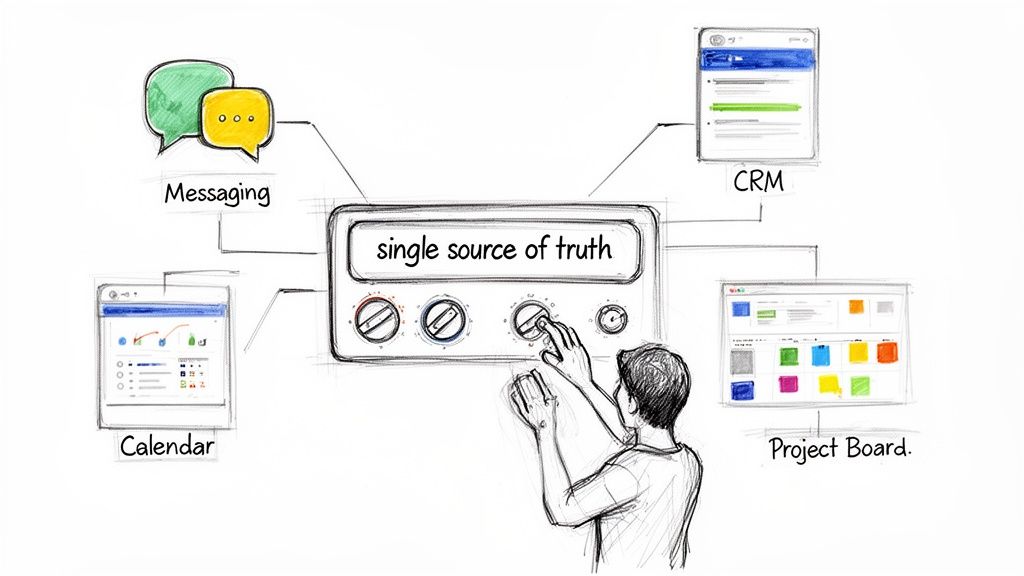
You’ve got your workflow mapped out. Now it's time to bring that dream to life. This is where you connect the dots, and your blueprint becomes a living, breathing system that handles the grunt work while you and your team focus on making magic happen.
Think of integrating your tools less like coding and more like snapping together LEGOs. Modern project management automation platforms are designed to play nice with the apps you already use daily—your CRM, calendar, Slack, you name it. The tech isn't the hurdle anymore; it's the enabler.
The dream of every operations manager is a "single source of truth." This is your central hub where everything flows automatically, killing confusion and putting an end to manual data entry for good. No more hunting through email threads for an update; the information comes to you, effortlessly and accurately.
Let’s walk through a real-world example. A new lead submits a form on your website. Without anyone lifting a finger, your AI employee instantly creates a contact in your CRM, spins up a new project in Asana from a template, and blocks out time for a discovery call on your sales rep's calendar. Everything is connected, consistent, and correct. This isn't just efficiency; it's operational bliss.
When one domino falls, all the others follow in perfect sequence, every single time. That’s the power of a truly integrated system.
Automation is fantastic, but it can't operate in a vacuum. A well-built system keeps your team informed, not in the dark. This is about building trust and visibility, so everyone feels in control even as tasks happen automatically in the background.
Here are some examples of smart communication loops:
This isn't some far-off concept. The numbers show it’s happening now. Experts predict that by 2030, a full 80% of traditional project management tasks will be run by intelligent systems. The market for AI in project management is expected to jump from $3.08 billion in 2024 to $7.4 billion by 2029, and with 46% of organizational processes already automated, the trend is clear.
You're not just making things faster; you're building a smarter operational engine. By connecting your tools and tweaking your automations, you create a system that anticipates needs, removes bottlenecks, and frees your team to do their best work. This is how you finally stop managing tasks and start leading strategy.
You’ve built your automated system, and you can already feel the difference. Meetings are shorter, updates are seamless, and your team is finally free from the soul-crushing grind of administrative work.
But that feeling isn't enough; you need to prove it. Measuring the return on investment (ROI) for your project management automation is what turns a cool experiment into an indispensable strategic asset. This is how you sell the dream to the rest of the company.
When you can walk into a meeting with hard data showing exactly how much time, money, and frustration you’ve saved, you’re no longer just an operations manager—you’re a strategic leader driving tangible growth.
The most obvious win from automation is time saved, but honestly, that’s just the tip of the iceberg. True ROI comes from a mix of quantitative and qualitative metrics that paint a full picture of the impact.
You’re not just reclaiming hours; you’re building a more efficient, accurate, and motivated team.
To truly understand the value, you need to look at a few key areas:
The dream you're selling is a workplace where your best people spend their time on their best work. Proving the ROI is how you make that dream a permanent reality, demonstrating that automation isn’t a cost—it’s an investment in your team’s potential.
Don’t get intimidated by the term "ROI." For most teams, a simple calculation is all you need to make a powerful point. It really just boils down to a straightforward comparison of the costs versus the gains.
A Simple ROI Formula:
(Value Gained - Cost of Investment) / Cost of Investment = ROI
Let's break that down with a real-world example. Imagine a marketing team of five people.
This isn’t just a hypothetical. The global project management software market is set to hit $15.06 billion by 2030 for a reason. High-performing teams are already seeing massive returns, with 77% relying on these tools to save an average of 498 hours per employee annually.
Automation slashes errors by 40-75% and delivers a positive ROI within 12 months for 60% of companies. These numbers make a compelling argument that's hard to ignore.
To help you get started, here's a table of essential metrics to track. Think of this as your dashboard for proving the value of every automation you build. It provides a structured way to monitor progress and show clear, quantifiable results.
| Metric Category | Specific KPI to Track | How to Measure | Target Improvement |
|---|---|---|---|
| Time Savings | Hours saved per employee per week/month | Time tracking data (before/after), surveys, process time analysis | 15-20% reduction in admin time |
| Cost Reduction | Reduced overtime costs, software license consolidation | Payroll reports, software subscription invoices | 10% decrease in operational costs |
| Productivity Gains | Number of projects/tasks completed per quarter | Project management software reports (e.g., Jira, Asana) | 25% increase in team output |
| Quality & Accuracy | Reduction in errors, rework requests, or data entry mistakes | Quality assurance logs, customer support tickets, internal audit reports | 50% reduction in human error |
| Team Morale | Employee satisfaction scores, reduced turnover | eNPS surveys, exit interview feedback, performance reviews | 10-point increase in eNPS |
By consistently tracking these KPIs, you move from "I think this is working" to "I can prove this is working." This data-driven approach is what separates good ideas from indispensable business strategies.
Ultimately, measuring success is about telling a compelling story backed by undeniable data. By tracking the right metrics, you can clearly show how project management automation is building a faster, smarter, and more profitable business.
You can explore more strategies for operational efficiency in our other articles on the Dooza blog.
Jumping into project management automation usually brings up a handful of very valid questions. It’s a big shift, so it makes sense to wonder about the cost, the complexity, and even how it might affect your team. Let's tackle these head-on so you can move forward with confidence.
Think of it this way: you’re not just managing projects anymore. You’re building an intelligent system that runs them for you. And that’s a lot more achievable than you might think.
This is probably the biggest myth holding people back. A few years ago, the answer might have been "yes," but that's ancient history now.
Modern no-code platforms are built for the rest of us—startups, small teams, and agencies—with affordable subscription models that can grow with you. The days of needing a team of developers and a six-figure budget are long gone.
Getting started is often as simple as connecting the tools you already use, like your calendar, CRM, or Slack. The real "investment" isn't money; it's the time you'll spend up front mapping out the repetitive tasks that are causing the most headaches. Once your AI employee is up and running, the ROI from reclaimed hours and fewer mistakes usually pays for the service many times over.
The dream of an automated workplace isn't locked behind a high price tag. It’s about being smart with your resources and choosing a platform that grows with you, turning a small monthly cost into massive gains in productivity and focus.
I hear this one a lot, and it comes from a place of real concern. But the reality is far more optimistic. The goal of project management automation isn't replacement—it's elevation. It’s all about freeing up your talented team from the monotonous, soul-crushing tasks that drain their energy.
When an AI employee handles the scheduling, data entry, and routine reporting, your team gets to focus on what you hired them for: strategic thinking, creative problem-solving, and building real relationships with clients. You know, the work that actually grows the business. The dream is to have a team that is energized and fulfilled, not burnt out.
The most innovative teams are becoming hybrid by design. They create a powerful partnership where human ingenuity and AI efficiency achieve way more together than either could on their own. You’re not getting rid of your people; you’re giving them superpowers.
Security is absolutely non-negotiable, and it's a top priority for any reputable automation platform.
When you're looking at different options, check for crystal-clear security policies, solid data encryption, and compliance with standards like GDPR or SOC 2. These aren't just flimsy plugins; they’re built with enterprise-grade security meant to protect your sensitive project and client info.
Always review a platform's security documentation before you commit. And once you're in, use built-in features like role-based access controls to make sure data integrity and confidentiality are locked down across your entire automated system.
Here's where the nuance comes in. While AI is a beast at handling structured, rules-based tasks, its role in creative and client-facing work is more of a powerful assistant, not a replacement. An AI employee can't invent a groundbreaking ad campaign on its own, but it can automate the entire workflow around that campaign.
Imagine how this could work for a digital agency:
In this scenario, your creative team spends less time buried in admin and more time actually being brilliant. The AI handles the "how," freeing up your team to focus on the "what" and the "why." This is where the magic of project management automation really happens—it unlocks human potential.
Ready to stop managing tasks and start building an intelligent, self-running operation? Hire your first AI employee with Dooza.co and see how automation can free your team to do their best work. Start automating today at https://dooza.co.
Automate your business with AI employees that work 24/7.
Discover the leading AI automation companies transforming business workflows in 2026. Learn how agentic AI and digital workers can boost your efficiency.
Discover 7 practical AI automation examples that save time, reduce costs, and boost productivity. Learn how to implement these workflows in your business today.
Join thousands of companies using Workforce to automate their work. Get started for free today.
No credit card required · 7-day money-back guarantee · Cancel anytime